This page contains an explanation of the two steps required for you to begin using your new username and e-mail address. There is also a list of frequently asked questions below.
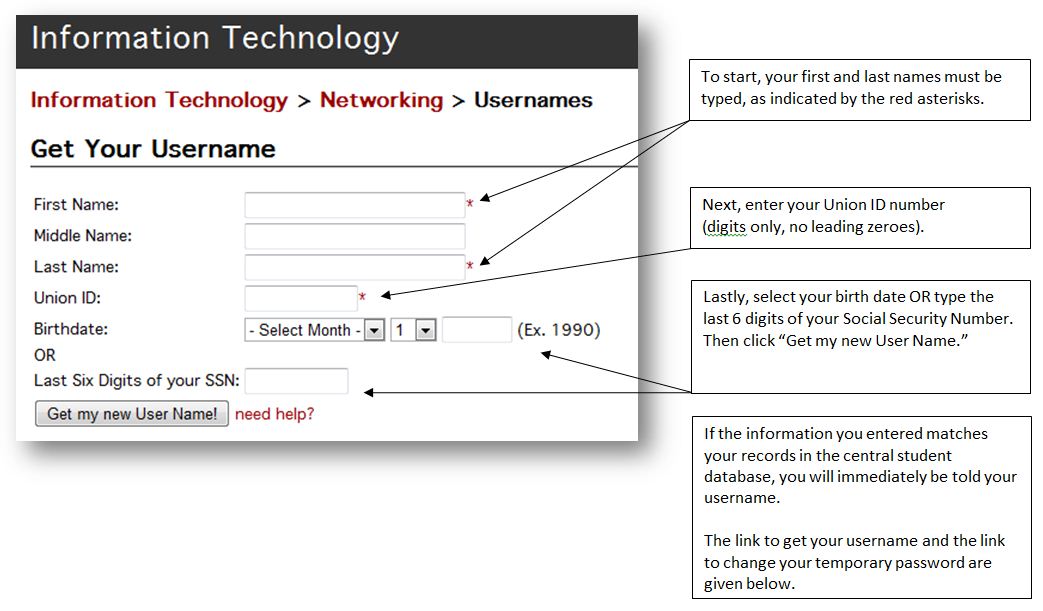
As explained in the example screenshot below, you can easily get your new username by completing a simple online form. Your new e-mail address will be your new username followed by @my.uu.edu
Note: When logging into any Union University system, always type your username using lowercase letters.
Your new username will have a temporary password associated with it. Your temporary password is the last 6 digits of your Social Security Number. You need to change this password before you begin using Blackboard, WebAdvisor, and your new email/storage accounts.
To learn your new username and to change your temporary password for access to all your accounts, complete these two steps:
Is it true I’m getting a new Union e-mail address and username? |
Yes! Your new username will be based on your name, not on your student ID number. Your new e-mail address will be your new username followed by @my.uu.edu |
|
Does this apply to all students? What about employees? What about alumni? |
All currently enrolled students, regardless of level or major or location, will get a new username and e-mail address. Employees (faculty, staff, administrators and adjuncts) will still use their same usernames and e-mail addresses. Recent alumni who have s1234567@my.uu.edu accounts at Microsoft’s Live@edu will also get new accounts there. |
|
Why is Union making this change now? |
This has been requested in the past. We are now able to take advantage of some other recent changes to provide usernames and e-mail addresses in this new format. |
|
When will my new username and address be available? |
Everything will be created and available December 20, 2010. |
|
Why was 12/20/10 chosen? |
Union’s online services are in demand 24 hours a day, 365 days a year. We researched class meeting times and determined that the smallest number of classes would be meeting during the week of December 20. The faculty members teaching those classes agreed that the changes could occur that week. In the worst case, if there were any technical problems, the IT staff would still have three normal working days to resolve the problems before Christmas break. |
|
What will my new username and e-mail address be? |
Visit www.uu.edu/it/networking/usernames/ to get your new username. You will have to enter your name, your Union ID number and either your birth date or the last six digits of your Social Security Number. If these entries match the information stored in Union’s central student database, you will be given your username. Your new e-mail address will be your new username followed by @my.uu.edu Your new username was e-mailed to your existing s123456@my.uu.edu e-mail address on 12/20/10. |
|
What is the new general format for usernames? |
The general format of any student’s new username will be first.last123 with all lowercase letters. There are five main things that determine a specific student’s username. Each kind of name mentioned in this section is a part of the student’s name as stored in the university’s central student database.
|
|
What happens if I change my name for legal reasons? |
After you contact the university about name changes for your general student records, you may contact IT’s student Help Desk to submit a request to change your username and e-mail address.
|
|
What about e-mail or files in my current accounts that I need to keep? |
After your new accounts are created on 12/20/10, you will have until March 9, 2011 (the last day to drop a class for the spring 2011 term) to forward e-mail messages and to move any files. After that date, all s123456-based usernames and e-mail accounts will be deleted. Your e-mail is available at www.outlook.com/my.uu.edu and your file storage space is available at skydrive.live.com . Each system requires you to log in using your full e-mail address. To transfer existing e-mail messages:
To transfer existing files:
|
|
What about my grades and financial information in WebAdvisor? What about my online coursework in Blackboard? |
You will log into each system with your new username, but information stored in WebAdvisor or Blackboard is not affected by this change. Also, the e-mail system inside Blackboard is not affected by this change. |
|
What uu.edu systems are affected by this change? |
Use your new username with these Union resources
|
|
Is there anything I must do before or after 12/20/10? |
On/after 12/20/10, before you use your new accounts or e-mail, you must change your new temporary password at password.uu.edu . Be sure to share your new e-mail address with others who may need to contact you. |
|
Who do I contact if I have questions or problems? |
Contact any campus’s student Help Desk regardless of where you are located.
Note: All Union University offices will close for Christmas holidays from noon December 22 through January 2. Help Desk services will not be available during this time. |
|
How will my teachers know my new e-mail address? |
They will be able to look up your address in the same way they have in the past. Also, official communications from various Union offices (Student Financial Planning, the Academic Center, etc.) will automatically be sent to your new address. |
|
How long will my s123456@my.uu.edu e-mail address and SkyDrive storage space remain active? |
Your existing outgoing e-mail address and SkyDrive storage space will remain active and available with your current password until 3/9/2011. You will need to monitor your e-mail address or set up a rule to forward your incoming e-mail to your new name-based e-mail address. Between 12/20/10 and 3/9/11 you should tell anyone who uses your outgoing/old address about your new address. You can also use that time to move files from your old storage space to your new storage space, as explained above. After 3/9/11, all s123456 accounts will be deleted. E-mail and files in those accounts will not be available after the accounts are deleted. |