Problems viewing this message? Read it online


It's From Someone I Know At Union University, So It's OK. Right?

Always Watch for [EXTERNAL]

Scammers take no breaks for social distancing. Phishing attempts involving fake tech support, coronavirus stimulus payments, warnings from a local hospital, and more are on the rise during the COVID-19 crisis, according to forbes.com.

"A lot of campaigns piggyback on a voice of authority. Emails with instructions from such an authority get more follow-through on the part of the victims.... The core root of phishing is identity deception."

Now you're asking "What about those messages from people I know at Union University?" Do you think it's from that person? Or do you know it is?

To keep yourself and the University safe, here are some tips and a reminder about phishing@uu.edu

How do I know if a message is not from a Union address?

  • The message's FROM field may have the name of a Union employee or student, but that's not enough to know.
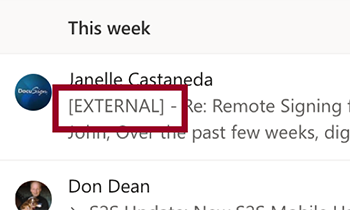
  • If the message did not originally come from an @uu.edu employee address or an @my.uu.edu student address, then it will have [EXTERNAL] in front of the Subject line. (see Figure 1 below)

Does [EXTERNAL] always mean I should be worried?

  • You will commonly receive messages from people outside Union, as a new message to you, as a reply, or as a forward. Those will include [EXTERNAL] somewhere in the subject field.
  • Always verify that the email's actual FROM address is who it appears to be.

How do I know what the sender's actual address is?

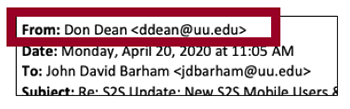
  • Select the message and then select Forward but do not actually send it. You should see a new message that includes the actual FROM address in the email header. (See Figure 2 below)
  • If the FROM email address ends with @uu.edu or @my.uu.edu then you can be certain it's a legitimate message from someone at Union.
  • If the FROM email address is a non-Union person and you are certain it's the correct address (e.g., the person works at FedEx and it's a fedex.com address), you can safely reply.

What if I believe it's a phishing attempt?

  • Forward the message to phishing@uu.edu
  • Please do not send the message to individual IT staff, to the FROM name, or to anyone else.
  • You'll receive an auto-confirmation email from "Phishing (Do Not Reply)" that verifies IT has received your submission. If any further steps are necessary, IT will contact you through the normal IT Help system.

Learn more at www.phishing.org/what-is-phishing

If you're not sure it's legit,
forward it to phishing@uu.edu


Figure 1 - [EXTERNAL] at the beginning of Subject


Figure 2 - Email header with actual From address


Questions? Need to contact IT Help?


    IT TechBrief footer