


IT Resources for Faculty
Faculty Options
When your access begins and ends
-
Near your hiring date, you'll get accounts for the services listed below.
-
You'll need to know your account name, your password and the format to sign into each service.
-
Human Resources tells IT when your account access ends, when you are no longer employed.
Knowing your sign-in information
-
Some services require your account name, some require your email address and some will accept either one as explained below. Your email address is your account name followed by @uu.edu
Your account name is included in a letter from IT, which you should have received from Human Resources during new-employee orientation or from your area's administrative-support person. Your temporary password is the last six digits of your Social Security Number.
Setting your password
-
You need to change your initial password to one that only you know.
Go to password.uu.edu
Signing into services
-
Use this guide to know what's required when signing into each service, in addition to your password.
- A - Account name is required (not your full email address)
- E - Email address is required (not your account name)
- A/E - Your account name or your email address can be used.
Important reminders
- You should never share your password with anyone.
- Sign off when you are finished working, to keep your information and the University's information secure.
Questions or Problems?
Are you legally changing your name?
My.UU
Access to many essential services; SelfService, Canvas, Microsoft365, events, news, employee/office directories, campus maps, social media, more
Learn about and get UU Mobile E
SelfService
Grade view/entry, employee pay stubs, student billing and financial aid, time entry, departmental budgets, faculty class rosters, FERPA, more
Sign into selfservice.uu.eduE Learn more
Canvas LMS
All online resources for your classes
Go to elearn.uu.edu Learn moreView faculty training at uu.edu/it/canvas
Critical need: Bandwidth
Email/Microsoft365
Official University email - Check it often, including Inbox>Other and Junk
office.uu.edu includes Outlook webmail, web version of Word, etc.
Suspicious messages? Learn more
Storage
Official, secure University space for private files (Microsoft OneDrive), departmental files (Microsoft Teams), and all-employee files (Microsoft SharePoint > Employee Homesite > University Public Folder)
Sign into office.uu.edu (web access)E Learn more
Security
PawPrint
Printing from your personally-owned laptop/desktop to selected printers; copying, free scanning at some locations; also known as PaperCut
Sign into printing.uu.eduA/ELearn morePawprint

PawPrint, also known as PaperCut, allows you to use any designated University printer to print a document stored on your computer/laptop. Look for this logo.
Without having to install any printer software, you can upload a document from your device when on campus and print it up to eight hours later on any printer with the PawPrint logo.
- If you are not familiar with the PawPrint process, review this detailed explanation (PDF).
- PawPrint works best with laptops and desktop computers. It may work with your tablet.
- PawPrint for students works with the PaperWise print-count system, which is described in the Accounts section of this page.
Pawprint Locations

The following Union University printers are enabled for PawPrint use. As more printers are enabled, this list will be updated.
Some printers can also (a) scan a document to email to yourself (free) and/or (b) make copies.
- Jackson
- The Logos library
- Writing Center (Penick)
- Center for Academic Success (Penick)
- Student Union Building - Post Office mailboxes
- Blasingame Academic Complex (BAC) southwest hallway; BAC-45
- White Hall - vending alcove on first floor
- Jennings Hall - commons area on third floor
- Bowld Commons
- McAfee Commons
- Germantown
- Open Lab (Room 209)
- Hendersonville
- Student commons
Additional services requiring your University account name and password are available in areas such as the The Logos library (research databases) and the Travel Registry.
see Accounts > Specialized Services on the IT page for Staff.
Computer Workstation
Each employee with University office space is provided an appropriate workstation for the employee's teaching or work responsibilities. It includes a desktop or laptop computer and other necessary software and equipment. The workstation is purchased by IT and is managed by IT throughout the workstation's life. See the Policies section of this page for more information about Equipment Disposition.
- Faculty members may choose between a Windows laptop or a Mac laptop. See the Policies section of this page for more information about Faculty Laptop Acquisition. IT determines equipment configurations.
- Staff members receive a PC with Microsoft Windows, unless a Mac is required for business purposes.
- Adjunct faculty members may use the general-purpose labs for work purposes at any time the labs are open and not in use for class. Non-office staff members in Facilities Management, Housekeeping and Safety & Security may also use labs during these times, within guidelines set by those areas' directors.
Software
Standard software is provided on each employee workstation. This generally includes:
- Microsoft 365 - Word, Excel, PowerPoint, Outlook (email and calendar), etc.
- Internet browser (Chrome, Firefox, Safari, Edge, etc.)
- PDF reader
- Anti-virus
Printing
Each office employee has access to a laser printer near the employee's area. Some areas have a color laser printer. Student labs have laser printers.
High-volume, color, or special printing/duplication can be performed by University Services (Jackson campus) at printing@uu.edu. State your printing needs in the body of the message and attach your file(s).
Employees and students can print documents saved on personal devices using PawPrint-designated printers. Student printing is managed through PaperWise. See the Accounts section of this page to learn more about these services.
Phone and voicemail - Star2Star
This information is for the Star2Star phone system installed at the Jackson, Germantown, Hendersonville, and MCUTS campuses.
See uu.edu/employee for a complete directory of all employee phone numbers.
Learn about the features of your Yealink phone, using its 15-minute video or two-page PDF. The phone model you have is based on your work requirements.
Initial setup steps
-
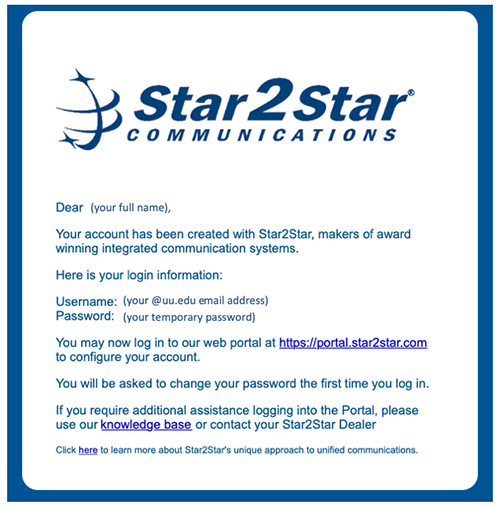
You will receive a personalized external email from Star2Star Communications (noreply@star2star.com) that contains your username and temporary password for the Star2Star system. See below for a picture of the email.
-
This is not a phishing attempt.
Using the link in the Star2Star email message, sign in with your UU email address and the temporary password. You'll have to change your temporary password.
-
Once you're signed in, on the Star2Star site's
Configuration page, select Voicemail. (See this
training video (4:25-8:35) for an overview.) Be sure to change your voicemail PIN, which is initially set as your four-digit UU phone extension. There are several other options here that you can change at any time including voicemail, Voicemail2Email, and FindMe/FollowMe explained below.
Basic use and features
-
Place a call: Enter the number and press the Send softkey below the phone screen
-
Answer a call: Pick up the receiver or press the Speakerphone button (bottom right of the keypad)
-
You can use four-digit dialing between campuses.
-
The Star2Star
voicemail guide uses specific terms. Your mailbox number is your four-digit Union phone extension. Your password for voicemail is the numeric password that you type when accessing your voicemail, also known above as your voicemail PIN.
The phone number for Star2Star voicemail is 731-661-5555.
-
Your Star2Star voicemail recordings will also appear in your email inbox.
-
You won't have to dial 8 or 9 when calling outside the University.
-
The
Star2Star Configuration page includes FindMe/FollowMe, allowing you to set up other phone numbers where you can be reached and how Star2Star will ring those numbers.
-
If you want to set up speed-dial numbers for your office phone, use the Star2Star Configuration page. If you set them up using the phone's menu, they will eventually be lost.
Example email you will receive from Star2Star Communications (noreply@star2star.com)
Advanced use - Union Station, selected administrative assistants
Resources in all classrooms
Classrooms are currently equipped with a computer, projector and document camera. Using these resources you can display PowerPoint slides, websites, videos or other digital content as well as physical media such as a book. If you have mobile devices (laptop, tablet, smartphone) and the appropriate connectors, you can also display content from those.
Overview and backup
-
Each employee is provided space to store private files or to share files within or between departments. If you save files on your computer's hard drive, you are responsible for their backup.
Purpose of each employee storage location
- Personal storage: This is provided through Microsoft OneDrive for Business, identified on computers as "OneDrive - Union University". No other person has access to any file stored there, unless you share it. (Each student has OneDrive space for personal files but students generally do not have access to the departmental or all-employee storage locations explained below.)
- Departmental files: Departmental file storage is provided through Microsoft Teams sites. Typically, no person outside the department has access to files stored there unless granted access by the Team owner. If you are associated with more than one department, you may have access to multiple Teams sites. In specific cases, student workers may have access to the department's space. A private Teams site can be self-created and self-managed by anyone in the University, for any legitimate purpose, with any appropriate members. Note: Each employee in the department/team can use (change, print, delete) any file/folder on the department storage space even if another departmental/team employee created it.
- All-employee files: All employees at all campuses can access the University Public Folder, to facilitate file sharing between departments/teams. The resources are securely stored on the Employee Homesite, with University Documents and University Forms. This is provided through Microsoft SharePoint. Note: Each employee of the University, regardless of department or campus, can use (change, print, delete) any file/folder in the University Public Folder even if another University employee created it, regardless of department.
Access to your personal OneDrive files
-
Learn more here about accessing your OneDrive storage when on campus or off campus.
Access to departmental files in Microsoft Teams
-
Microsoft Teams provides tools for communication and collaboration, including file storage/sharing. It is available as a webapp when signing into office.uu.edu and as a downloadable native app for each of your computers and devices.
-
Learn about Teams on IT's eWork page.
-
Learn about Teams file management.
Access to the University Public Folder on the Employee Homesite
-
The University Public Folder is conveniently available through UU Mobile, either at mobile.uu.edu or using the UU Mobile app. (Search your app store for 'union university'.) Use the green Employee Forms & Docs tile to access these shared resources, University Documents, University Forms, and the president's Town Hall videos.
Microsoft SharePoint
-
Your Microsoft Teams site(s) and the Employee Homesite are based on Microsoft SharePoint. You may want to get the SharePoint app for your mobile devices.
Internet
All University computers on the University network have internet access. Student access to the internet is filtered based on content and site.
Wireless
All buildings owned by the University provide wireless network service, including a public wireless network.
Employee_WPA is the University's secure wireless network. It is available only to employees. Students and guests may use the unsecured UU_Wireless network.
When to use Employee_WPA
- Use Employee_WPA for all smartphone, tablet, laptop, or desktop wireless access on any Union University campus.
- Any University service that can be accessed (isn't prevented from) using UU_Wireless should be accessed using Employee_WPA. This includes services such as TargetX and Pharos.
- You must use Employee_WPA for on-campus wireless access to Ellucian Colleague.
How to use Employee_WPA
- Connect to Employee_WPA as you normally do for other wireless networks. Steps vary by device, operating system, and version. Use these tips to set up access.
- Sign in with your University username (not email address) and password.
- If you are asked for a security type, select WPA2 or WPA.
- If you are asked to trust HiveManager, do that.
General-purpose labs and clusters
General-purpose computer labs are available for current students and employees. Labs are sometimes reserved for classes or may be unavailable for other reasons including official holidays or inclement weather. It is University policy that only students registered for the class meeting in the lab are allowed to be in the lab at that time.
Jackson-campus labs
The Logos library, Barefoot's Joe, the McAfee Commons building, and the Bowld Commons building have computers for general student use. Bowld has both PCs and Macs. The Writing Center in the main Penick hallway has computers for writing-related use.
The Logos - First floor - 80 computers
- Small Instruction Lab - Room 110 - 18 PCs
- The Learning Center - Room 123 - 12 PCs
- Large Instruction Lab - Room 131 - 32 PCs
- South lobby (near Miller Tower) - 3 PCs, 3 Macs
Germantown-campus labs
- To find out if the building will be open on a specific night, call 901-759-0029.
- Monday - Thursday: 7:30 a.m. - 9:30 p.m. (If there are no night classes scheduled, the building will close at 4:30 p.m.)
- Friday: 7:30 a.m. - 4:00 p.m.
- Saturday, Sunday: The campus is closed.
Laptops
Laptops are available for employee reservation and checkout on a short-term basis. This service is offered to support University work when traveling. Contact IT Help.
What if I am an employee and a student?
If you are an employee taking classes, you will use your employee account name and e-mail address for all your class-related work. You will not be issued a separate set of student accounts.
How do I reserve a computer lab?
If you want to reserve a lab for an entire term, your department chair or dean needs to indicate that when submitting course information to the Academic Center (Registrar) for the upcoming semester/year.
If you want to reserve a general-purpose lab for part of a single day, ask your area's support person to submit a room request using the University's room-reservation system.
Other labs are managed by individual academic departments.
How can I grade paper-based multiple-choice tests?
There is a Scantron scanner on the Jackson campus in Penick room F-29. Contact University Services in the Student Union Building about test forms.
How do I reduce problems with my personally-owned computer?
Periodically install security patches for the operating system. To get started...
- On a PC with Windows 10, open the Settings app and select Update & Security.
- On a Mac, go to the Apple menu, select App Store, then click Updates.
Also, get appropriate anti-virus software and keep it updated.
Keep backups of any important information that's stored on your computer.
If I'm having problems with my personally-owned computer, who can help?
If you are having problems with one program, try restarting it or restarting your computer. If that does not help, try uninstalling the program and reinstalling it.
If you are having problems beyond a single program and restarting your computer does not help, if your computer is still under warranty then you should contact the manufacturer. If it is out of warranty, you can contact local computer repair companies.
Acceptable Usage Policy - applies to all using UU technology
Last Updated by Information Technology April 2022
This AUP defines responsible and appropriate usage of Union University's information technology resources in fulfillment of the Mission of the University. It applies to everyone using the University's Information Technology Resources.
Responsible, appropriate usage is always ethical, reflects honesty in all work, shows stewardship in the consumption of shared resources, and is guided by Christian principles.
This AUP will not be static, due to the dynamic nature of technological advances. The University reserves the right to amend, to modify or to strengthen this AUP at any time and without prior notice, to maintain and to enhance the definition of acceptable usage.
I. Policy Objective
- REASON FOR POLICY
Because Clients may have access to (1) sensitive information due to their University roles and (2) shared resources, it is imperative that behavior and activities always comply with this AUP. - SCOPE OF POLICY AND ENTITIES AFFECTED
The AUP governs use of all Information Technology Resources and all Client Resources, regardless of location. Each Client always assumes responsibility for his or her own behavior while utilizing any Information Technology Resources. Failure to comply with this AUP may adversely affect the Mission of the University and may result in Client disciplinary action.
Additionally, the University reserves the right to remove or to restrict a Client's privileges and access to Information Technology Resources without notice, as needed to maintain appropriate and secure use of Information Technology Resources.
Any knowledge of a violation of this AUP must be immediately reported to the employee's supervisor and to the Associate Vice President for Information Technology or his or her designee.
II. Definitions
Throughout this AUP, the following terms will have these specific associated meanings:
- Client - current or prospective students, current or prospective employees, alumni, retirees, volunteers or guests of the University who use Information Technology Resources
- Information Technology Resources - resources owned, leased, licensed or used by Union University that include but are not limited to software, hardware, wireless and physical networking equipment/services, telecommunication equipment, computer labs, workstations, media equipment, storage devices (CDs, DVDs, USB drives, network drives, removable drives, solid-state drives), cloud-based services (Microsoft OneDrive, Teams, etc.), internet service, email, externally-hosted or on-premise services, academic systems (Instructure Canvas LMS, etc.), Enterprise Information Systems (Ellucian Colleague, SelfService, Blackbaud Raiser's Edge, Microsoft SharePoint, Teams etc.), data/information, digital assets, etc.
- Client Resources - resources owned, leased, licensed or used by Clients to utilize Information Technology Resources in any ways that include but are not limited to computers, tablets, smartphones, displays, cloud-based services, gaming consoles, printers, etc.
- Information Technology - the group of designated University staff members who maintain Information Technology Resources (Information Technology is not responsible for installing, supporting or maintaining Client Resources.)
III. Policy Content
- CLIENT ACCESS AND PRIVILEGES
- Access Provision
The University provides appropriate access to Information Technology Resources, based on Client roles and requirements. Each student receives initial account access upon acceptance to the University. Each employee receives access on or before his or her official date of employment, as determined by the Office of Human Resources.
- Client Credentials
Selected Clients (current students and current employees) will each be issued account credentials (a unique account name and a private password) to provide this access. Each of those Clients is responsible for all activities performed using his or her credentials.
Each password is an essential element of the University's information security. A strong University password, different from the Client's non-University passwords, is the front line of protection. Each Client is responsible for maintaining password confidentiality by never sharing a password with another person. Each Client should change his or her password periodically at password.uu.edu, to help ensure a high level of University security.
Any suspected unauthorized use of Client credentials must be reported immediately to IT Help at help@uu.edu or 731-661-HELP.
- Access Termination
Each enrolled student's account access is disabled 182 days after the last date of the student's active enrollment at the University. For accepted students who did not enroll in classes, account access is disabled two days after the end date of the term for which the student applied. When account access ends, all files, email, and other content associated with the student's technology accounts will be deleted.
Employee access will be terminated upon notification of the employee's separation by the Office of Human Resources. The employee's supervisor or other authorized University administrator may request from the Office of Human Resources that the employee's files, email, and other content be maintained for review or for reassignment to another employee.
Information Technology Resources assigned to the employee (computer, monitors, laptop, printer, etc.) are subject to IT's Equipment Disposition policy, available in the Policies section of uu.edu/it/faculty and uu.edu/it/staff
- Use of Client Resources on University Networks
Client Resources have access to use the University's wireless network to the extent that use does not pose security threats, network limitations, or potential/actual disruption of network services.
Employees may connect Client Resources to the secure wireless network to access Information Technology Resources provided they adhere to the strict guidelines of data stewardship defined throughout this AUP.
Clients are not allowed to use Client Resources on the University's wired network for any purpose without prior approval from Information Technology.
Information Technology reserves the right to change or restrict Client Resource access to network access for the protection of Information Technology Resources, without prior notice.
- Access Provision
- ACCEPTABLE, UNACCEPTABLE AND UNAUTHORIZED USAGE
- Acceptable Usage of Information Technology Resources
As stated in the AUP's Rationale, Clients receive access to Information Technology Resources in fulfillment of the Mission of the University. Usage guided by the Mission and the University's four Core Values is considered acceptable.
- Unacceptable Usage of Information Technology Resources
Unacceptable, prohibited usage of Information Technology Resources includes but is not limited to:
- transmitting, displaying, printing, or storing any material/software in violation of any federal, state, or local laws including copyright law;
- transmitting, displaying, printing, or storing inappropriate material, including but not limited to:
- text, images, video, audio, or other digital content, with the purpose to harass, intimidate, threaten, abuse, illegally discriminate against, or offend another person on the basis of race, color, religion, sex (including gender identity, sexual orientation, and pregnancy), national origin, age, disability, or genetic information;
- sexually explicit, obscene, or pornographic comments or images;
- fraudulent content;
- using Information Technology Resources to harass or bother, whether or not an actual message is communicated, or where no purpose for communication exists, or where the recipient has expressed a desire for the communication to cease;
- disrupting or damaging administrative, academic, or related activities of another Client;
- violating or threatening to violate the privacy of another Client;
- forging email or other digital communications;
- distributing unsolicited or unwelcome email or other digital communications;
- installing or using any unauthorized Peer-to-Peer (P2P) file-sharing service;
- connecting Client Resources to Information Technology Resources except as allowed by AUP III.A.4;
- engaging in or promoting illegal, unethical, or harmful activities;
- engaging in any other practice or activity that, in the opinion of the University administration, constitutes unacceptable behavior, results in the misuse of Information Technology Resources, or jeopardizes the operation of Information Technology Resources.
If, in the interest of authentic academic or administrative work, a Client needs to perform a specific task considered unacceptable, a request to perform the specific task must be submitted in advance by the student and his or her supervising employee, or by the employee and his or her supervisor, for review by the Associate Vice President for Information Technology.
Commercial and not-for-profit uses of Information Technology Resources are prohibited unless formally authorized by University administration. Clients are expected to be responsible stewards of Information Technology Resources and to limit use to activities related to the Mission of the University.
- Usage of Learning Spaces
Learning spaces include computing labs, discipline-specific labs, classrooms, libraries, various common areas, other venues, etc. and associated Information Technology Resources. Each learning space is available when not in use for a class, scheduled meeting, or other University-approved event. However, use may be subject to approval by the department responsible for the specific learning space.
Clients are expected to use learning spaces in a responsible manner, as defined in this AUP. Clients must not cause disruption, display abusive or inappropriate behavior towards other Clients, or create disturbances.
- Usage of Workstations
University-owned workstations in learning spaces, offices, and other University locations are configured with University-approved software and are maintained by Information Technology. Clients must not attempt to change the configuration on these workstations unless authorized in advance by Information Technology leadership. Unauthorized changes must be reported immediately to the Information Technology Help Desk help@uu.edu or 731-661-HELP.
- Acceptable Usage of Information Technology Resources
- PRIVACY AND INFORMATION TECHNOLOGY RESOURCES
Information security is mandated by the federal government through the Family Educational Rights and Privacy Act (FERPA), the Gramm-Leach-Bliley Act (GLBA), and other legislation. Lack of compliance can result in substantial institutional fines as well as individual fines or imprisonment. Your part in this compliance is essential to the mission of Union University.
- Privacy Expectations for Information Technology Resources
The University has no obligation to monitor file/message content residing on or flowing through the University's information systems. However, the University reserves the right to review or remove any message, file, database, media, or other material from its Information Technology Resources to secure and protect the data resources of the University.
At any time, without prior notice and for any reason, the University reserves the right to examine or to monitor:
- any Information Technology Resources including email, voicemail, network/workstation/portable/hosted files, and directories;
- any Client Resource using or connected to Information Technology Resources;
- internet use of Clients using the University's wired or wireless network.
These examinations are performed to assure compliance with this AUP, federal and state laws, and other University policies, to support internal investigations, to comply with legal requirements, such as a subpoena or court order, or to assist with the management of Information Technology Resources.
- Disclaimer of Responsibility for Damage to Data, Software, or Hardware
The University uses access controls and other security measures to protect confidentiality, integrity, and availability of the information associated with Information Technology Resources. In keeping with these objectives, the University maintains the authority (1) to restrict or revoke any Client's access, (2) to inspect, copy, remove, or otherwise alter any Information Technology Resources that may undermine these objectives, and (3) to take any other steps deemed necessary to manage and to protect Information Technology Resources. The University disclaims any responsibility for loss or damage to data, software, or hardware that results from its efforts to meet these security objectives.
- Treatment of University Confidential and Proprietary Information
University-generated programs, system files, programming codes, and related documentation are confidential and must not be removed, tampered with, altered, or destroyed when an employee, student worker, consultant, or contractor leaves the employ of the University.
- Treatment of Third-Party Confidential and Proprietary Information
Unless specified otherwise by contract, all confidential or proprietary information, including software, databases, and system resources entrusted to the University by a third party must be protected by University employees as though it were the University's confidential information.
- Storage of Sensitive Information on Portable, Networked or Remote Resources
Portable, networked, or remote data devices/systems can provide Clients convenient remote access to the University's data for business purposes. These devices/systems are included in the list of Information Technology Resources.
Employees, including student workers, must protect any sensitive and personally identifiable information (PII) stored on portable, networked, or remote data devices/systems from unauthorized access.
This must be done through the use of appropriate measures, including, but not limited to:
- disk and file encryption
- effective password protection
- up-to-date virus protection and malware detection/removal products
- use of data-destruction procedures when information is no longer needed
- use of practices for purging, overwriting, or degaussing equipment when ownership changes
- reasonable safeguards to prevent theft of the device and/or viewing protected information
- use of multi-factor authentication
- use of data loss prevention (DLP) services
- adherence to GLBA, GDPR, HIPPA, FERPA, and other regulatory requirements
- limitation of protected data and PII stored on the device to the "minimum necessary" to accomplish the purpose
- training in the use of PII by the employee's immediate supervisor, Information Technology, or the Office of Human Resources at the time of hiring.
- Privacy Expectations for Administrative Data
It is imperative that all administrative data are received, stored, and maintained by University employees (including student workers) in a secure and confidential manner. This information is stored in a variety of formats including printed documents, electronic databases, digital files, and document images.
The University is responsible for the accuracy, integrity, and confidentiality of this data. Data must be treated as confidential unless approved for public release. By law, certain electronic institutional data are confidential and may not be released without proper authorization to the appropriate requester. Professional or personal behavior can affect or threaten the security and confidentiality of University data.
All employees accessing the University's Enterprise Information Systems are required to adhere to the following policies. They are required to sign the Employee Confidentiality Agreement upon employment. That agreement is included as an addendum to the Faculty Handbook, the Staff Handbook, the Student Employment Handbook, and all other relevant area-specific employee documents.
- Unauthorized use of any information in files maintained, stored, or processed by Information Technology Resources is prohibited.
- No Client is permitted to seek personal benefit or to allow others to benefit personally from the contents of any University data.
- No Client is permitted to distribute data except as defined by the University.
- No Client shall knowingly include, or cause to be included, in any record or report, a false, inaccurate, or misleading entry. No one will knowingly change or delete or cause to be changed or deleted an entry in any record or report, unless expressly authorized to do so and in accordance with Union University's Faculty Handbook, Staff Handbook, Student Employment Handbook, or other related policies and procedures.
- No official record or report, or copy thereof, shall be removed from the office where it is maintained or copied or printed via electronic means except in the authorized performance of a person's duties and in accordance with established procedures of the University. Copies made for the performance of a person's duties shall not be released to third parties except when required by a work assignment.
- Information Technology Resources, when not in use, must be locked by a standard operating-system, keypad, or other password-locking mechanism.
- No one is to aid, abet, or conspire with another to violate any part of these policies.
- Client responsibility for information security, confidentiality, and integrity continues after leaving a position or employment at the University.
- Clients must report violations to a supervisor or to the Office of Human Resources, as soon as possible.
- Privacy Expectations for Information Technology Resources
- INTELLECTUAL PROPERTY
Respect for the intellectual property of others is essential to the Mission of the University. Unless specific ownership of intellectual property has been established in accordance with the University's Copyright & Intellectual Property Policies (see Faculty Handbook), the University retains legal ownership of the contents of all Information Technology Resources.
The University's institutional data will not be released to internal or external entities, graduate students, or undergraduate students without expressed, written approval from University Administration.
- Copyright Laws
Clients are expected to follow the University's Copyright & Intellectual Property Policies. Those policies adhere to laws regulating the use, distribution, and reproduction of copyrighted works. They also provide clear guidelines for permissible copying under the fair-use doctrine, while maximizing the educational benefits of using copyrighted materials in the classroom and in other educational settings.
Works protected by copyright may not be accessed or distributed by file sharing, peer-to-peer technology, or any other method violating sections 501-513 of the United States Code Title 17.
- Software Licenses
The University strongly supports strict adherence to license agreements and copyright holder notices. Duplication or distribution of software materials without the permission of the copyright owner is illegal.
Only software that supports the Mission of the University should be used on Information Technology Resources. That software includes but is not limited to:
- software purchased and installed by Information Technology under a site agreement;
- software purchased as a single copy and installed by Information Technology on a single device;
- software developed by employees or students;
- public-domain software and software contributed to the University;
- freely available software that may not be in the public domain, such as software licensed under General Public License (GPL)
- software licensed under software-as-a-service (SaaS/cloud-based) agreement
Illegal copies of copyrighted software may not be made or used on Information Technology Resources. The legal or insurance-indemnification protection of the University and its Trustees will not be extended to employees or students who violate copyright laws. Software not acquired by the University via an officially sanctioned mean as stated above will not be installed or operated on Information Technology Resources.
- Trial Licenses for Software
Freeware, shareware, and trial-ware are covered by copyright and are subject to the terms and conditions defined by the holder of the copyright and by copyright policies of the University.
- Fair Use
Unless permission from the copyright owner(s) is first obtained, making multiple copies of materials from magazines, journals, newsletters, software documentation, and other publications is prohibited unless it is both reasonable and customary. This notice of "fair use" is in keeping with copyright laws as referenced at copyright.gov
- Copyright Laws
- DISCIPLINARY ACTION
Disciplinary action shall follow existing University policies and procedures governed by the applicable provisions of the Student Handbook, Faculty Handbook or Staff handbook, and by the applicable local, state, and federal laws.
The following disciplinary sanctions outline some, but not necessarily all, actions that may be taken either singularly or in combination by the University against violators of this AUP:
- warning to notify the individual that continuation or repetition of specified conduct may be cause for other disciplinary action;
- reprimand in writing indicating further violation may result in more serious penalties;
- restriction of Information Technology Resource privileges for a specified period;
- University probation, suspension, or expulsion;
- restitution to reimburse the University for damage to or misuse of Information Technology Resources or facilities.
During an investigation, any of these disciplinary sanctions may be applied until a final determination has been made in regard to the charges made against the individual. In the event that other University regulations are violated, additional penalties may be imposed. Information concerning illegal use of Information Technology Resources shall be turned over to law enforcement agencies for possible felony prosecution.
- POLICY REVIEW PROCESS
This policy will be periodically reviewed to make appropriate adjustments to the AUP, to update risk assessment and remediation, and to review and update material.
As a general goal, Union University's IT desires to provide technical systems that are reliable, secure, and responsive. It is critical for Union University to have a policy that addresses the usage of wireless networking, including aspects of security, compatibility, and radio-channel interference.
- No personally-owned wireless access points are to be connected to the University network.
- Any unapproved access point discovered in operation and connected to the University network is subject to being disabled and/or removed immediately and indefinitely.
Union University institutional data will not be released to internal, external, graduate or undergraduate students at this time. Adopted by the Senior Leadership Team - October 2, 2012
All applicable end-of-support or end-of-need computer/media equipment must be returned to Information Technology (IT) for proper disposition. This includes equipment purchased by IT, by individual departments, or through grants.
This policy applies to the following types of University-owned equipment:
- computers - desktops, laptops, monitors
- printers, scanners
- televisions, projectors, speakers, amplifiers, control boards
- power supplies, docking stations
- other similar items
It does not apply to scientific devices and similar equipment. If you have any questions regarding applicability, please contact IT.
No University-owned equipment will be sold to Union employees.
Background
Technology/media equipment often contains toxic elements such as mercury and lead. The Environmental Protection Agency dictates proper handling and disposal of hazardous materials. These regulations, as stated in the Resource Conservation and Recovery Act (RCRA), establish more restrictive requirements for institutions and organizations than for individual households. These requirements specify delivery of such equipment to an approved hazardous waste disposal facility or recycler, rather than to a solid waste landfill used for residential disposal.
Redeployment/Disposal of Computer Equipment
IT is responsible for the life cycle management of the University's IT hardware resources and will determine if the equipment should be redeployed, donated, sold or discarded.
Equipment determined to have remaining cash value will be sold to vendors of used equipment, non-profit organizations, or other vendors. Obsolete equipment may be (a) given to e-recyclers or (b) donated to non-profit organizations upon written request from the organization. Union University provides no support or warranty, implied or expressed, for any equipment sold or donated.
Information security and privacy standards are determined by governmental regulations, state and federal, and by University policies. In order to comply with such standards including FERPA and HIPAA, IT will erase all data from computer hard drives or other storage media to ensure that no data can be recovered. Union complies with the DOD (Department of Defense) standards DOD 5220.22-M for erasing data on storage media prior to the disposition of computer equipment. If the storage media cannot be erased according to these specifications, the storage media will be destroyed.
Our Mission
- Enabling, empowering, and supporting those we serve
through excellence in technology leadership,
alliance of strategic partnerships, and
commitment to faithful innovation.
Our Core Values
- Integrity - Uncompromising adherence to doing the right thing the right way
- Dependability - Diligently and consistently following through on our commitments
- Innovative - Delivering higher value by making what we do even better
- Affirming - Creating a positive, fun work environment with a team who love what they do
- Teachable - Acquiring and sharing our skills, experiences, and knowledge to benefit one another every day
- Community - Building each other up by caring for the whole person and their families
For IT staff contact information and locations, see the University's departmental directory.
Go to the IT Staff pageFor face-to-face IT Help needs...
- Germantown - office 208
To find IT offices on the Jackson campus, look for area 12 on the Penick Academic Complex map. Other IT offices, including eLearning Success & Media Services, are located on the D/E hallway (area D1 of the Penick map).
You can contact the IT Help 24 hours a day, 365 days a year, by emailing the Help address, by calling the Help line or by signing into the Help website. We'll respond in a timely manner.
If you need to communicate with us directly by visiting, please be aware of our business hours.
- IT professional staff are here to serve you beginning at 8:00 a.m. each workday.
- University offices close at 4:30 p.m.
- IT Help is closed on weekends.
- IT offices, general-purpose computer labs, and IT Help are closed for all University holidays.
- These areas are closed for inclement-weather events posted on uu.edu. Weather schedules (late openings, early closings, all-day closings) may vary by campus.
- We will respond to your needs as soon as possible.